本地浏览器 Agent 实战:LM Studio + Laya 实现完全本地化的”快慢思考”

引言:为什么浏览器 Agent 需要”快慢思考”?
想象一下你在网上购物:你会先思考”我要买什么”(慢思考),然后在页面上快速点击”加入购物车”按钮(快思考)。传统的浏览器 Agent 每一步都用大语言模型(LLM),就像每次点击都要深思熟虑,既慢又贵。
Jev 是 TypeSafe AI 提出的”系统一”(System One)决策模型,专门解决这个痛点。它将决策分为两层:
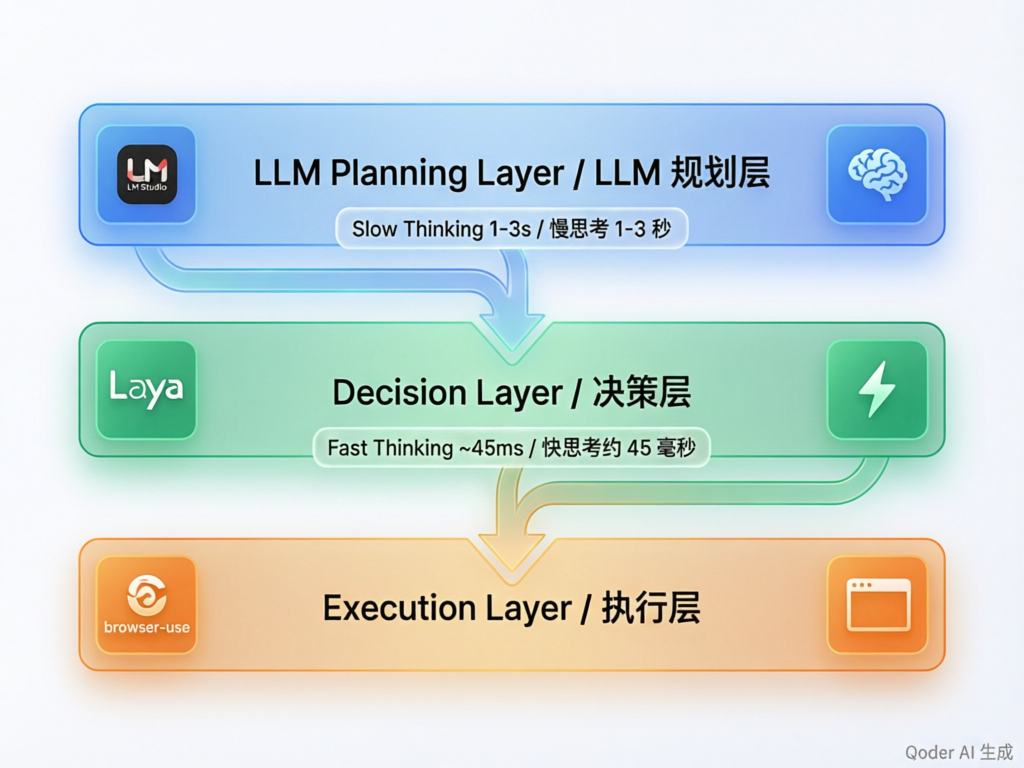
- 规划层(慢思考):LLM 理解用户意图,制定执行计划(1-3秒)
- 决策层(快思考):Jev/Laya 为每一步选择具体动作(~45ms)
这种”快慢分工”让浏览器 Agent 的速度提升 10 倍,成本降低至 1/10。
本文将带你实现一个完全本地化的浏览器 Agent,使用 LM Studio + Laya + browser-use,无需任何云端 API,成本为零。
架构设计:三层分离的本地方案
核心组件
| 层级 |
组件 |
职责 |
延迟 |
| 规划层 |
LM Studio |
理解意图,制定计划 |
1-3s |
| 决策层 |
Laya 0.3.4 |
选择动作,判断成功 |
~45ms |
| 执行层 |
browser-use |
驱动浏览器,执行动作 |
100-500ms |
为什么选择这个方案?
- 完全本地化:所有模型在本地运行,无需联网(首次下载除外)
- 零成本:没有 API 调用费用
- 隐私安全:数据不离开本地
- 可定制:可以根据需求调整模型和逻辑
技术实现:从零搭建浏览器 Agent
第一步:环境准备
我们使用 uv 作为包管理器(比 pip 快 10-100 倍),并配置清华镜像源加速下载。
pyproject.toml 配置:
1
2
3
4
5
6
7
8
9
10
11
12
13
14
15
16
17
| [project]
name = "jev-browser-agent"
version = "0.1.0"
requires-python = ">=3.11"
dependencies = [
"browser-use>=0.1.0",
"langchain-openai>=0.1.0",
"langchain-community>=0.1.0",
"laya==0.3.4",
"requests>=2.31.0",
"python-dotenv>=1.0.0",
]
[[tool.uv.index]]
url = "https://pypi.tuna.tsinghua.edu.cn/simple"
default = true
|
安装依赖:
第二步:启动 LM Studio
- 下载并安装 LM Studio
- 下载多模态模型(推荐):
llava-v1.6-mistral-7b - 视觉理解能力强bakllava-1.0 - 轻量级qwen-vl-chat - 中文支持好
- 点击 “Start Server” 启动本地服务器
- 确认 API 地址:
http://localhost:1234/v1
测试连接:
1
2
3
4
5
6
7
8
9
10
11
| from langchain_openai import ChatOpenAI
llm = ChatOpenAI(
base_url="http://localhost:1234/v1",
api_key="lm-studio",
model="loaded-model",
temperature=0.7
)
response = llm.invoke("用一句话解释什么是浏览器自动化")
print(response.content)
|
第三步:配置 Laya 决策引擎
Laya 是 Jev 的开源替代品,支持本地部署。它的 API 使用字典格式定义问题:
1
2
3
4
5
6
7
8
9
10
11
12
13
14
15
16
17
18
19
20
21
22
23
24
25
26
| from laya import Router
router = Router()
router.preload()
questions = {
"action": {
"type": "choice",
"instructions": "选择下一步操作",
"criteria": {
"click_search": "点击搜索按钮",
"input_text": "在搜索框输入文本",
"scroll_down": "向下滚动页面",
"done": "任务完成"
}
}
}
state = "当前页面是百度首页,有搜索框和百度一下按钮"
result = router.predict(state=state, questions=questions)
print(result)
|
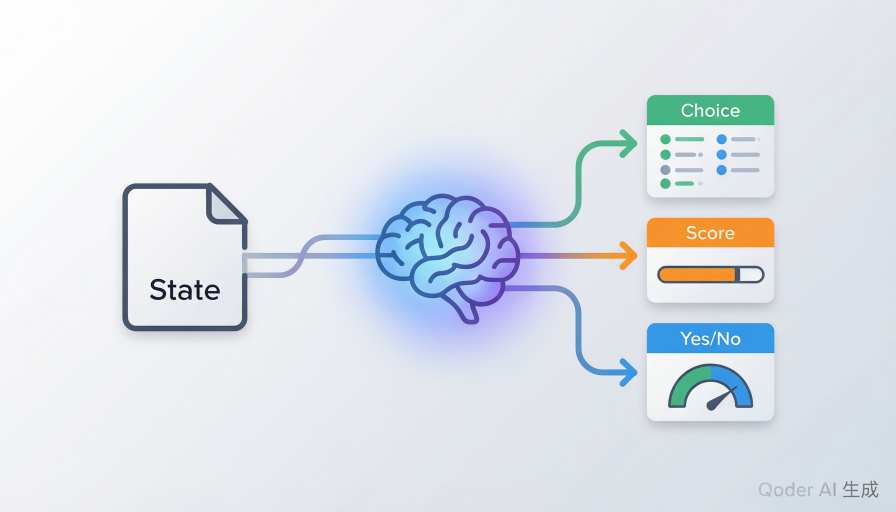
三种决策类型:
- Choice(多选一):从多个选项中选择
- Noul(是/否):二元判断,如”页面是否加载完成”
- Score(评分):在量表上打分,如”用户满意度 1-5”
第四步:构建完整的决策引擎
将 Laya 封装成决策引擎类,提供统一的接口:
1
2
3
4
5
6
7
8
9
10
11
12
13
14
15
16
17
18
19
20
21
22
23
24
25
26
27
28
29
30
31
32
33
34
35
36
37
38
39
40
41
42
43
44
45
46
47
48
49
50
| class LayaDecisionEngine:
"""Laya 本地决策引擎"""
def __init__(self):
from laya import Router
self.router = Router()
self.router.preload()
def decide_action(self, state: Dict, action_space: Dict) -> Dict:
"""
使用 Laya 选择下一步动作
Args:
state: 页面状态 {url, title, elements, description}
action_space: 动作空间 {idx: description}
Returns:
{action_idx, action_desc, confidence, latency_ms}
"""
start_time = time.time()
criteria = {str(k): v for k, v in action_space.items()}
questions = {
"action": {
"type": "choice",
"instructions": "选择下一步操作",
"criteria": criteria
}
}
result = self.router.predict(
state=f"URL: {state.get('url', '')}\n标题: {state.get('title', '')}",
questions=questions
)
latency_ms = (time.time() - start_time) * 1000
action_result = result.get("action", {})
action_idx = int(action_result.get("answer", 0))
confidence = action_result.get("confidence", 0.0)
return {
"action_idx": action_idx,
"action_desc": action_space.get(action_idx, "未知"),
"confidence": confidence,
"latency_ms": latency_ms
}
|
第五步:整合 browser-use
browser-use 负责浏览器自动化,执行具体的动作:
1
2
3
4
5
6
7
8
9
10
11
12
13
14
15
16
17
18
| from browser_use import Agent
from langchain_openai import ChatOpenAI
llm = ChatOpenAI(
base_url="http://localhost:1234/v1",
api_key="lm-studio",
model="loaded-model"
)
agent = Agent(
task="在百度搜索 'Python 教程'",
llm=llm,
)
result = await agent.run()
|
代码实战:完整示例
最小化示例
下面是一个完整的示例,展示如何组合使用 LM Studio 和 Laya:
1
2
3
4
5
6
7
8
9
10
11
12
13
14
15
16
17
18
19
20
21
22
23
24
25
26
27
28
29
30
31
32
33
34
35
36
37
38
39
40
41
42
43
44
45
46
47
48
49
50
51
52
53
54
55
56
57
58
59
60
61
62
63
64
65
66
67
|
"""
最小化示例:LM Studio + Laya
"""
import time
from langchain_openai import ChatOpenAI
from laya import Router
def main():
llm = ChatOpenAI(
base_url="http://localhost:1234/v1",
api_key="lm-studio",
model="loaded-model"
)
router = Router()
router.preload()
user_request = "帮我搜索 Python 教程"
print("步骤 1: LLM 理解用户意图")
plan_prompt = f"""用户请求: {user_request}
请制定执行计划,列出前 3 个步骤。"""
plan = llm.invoke(plan_prompt)
print(f"执行计划: {plan.content}")
print("\n步骤 2: Laya 选择具体动作")
page_state = "当前页面是百度首页,有搜索框和百度一下按钮"
questions = {
"action": {
"type": "choice",
"instructions": "根据执行计划,选择最合适的下一步操作",
"criteria": {
"input": "在搜索框输入 'Python 教程'",
"click_search": "点击百度一下按钮",
"click_news": "点击新闻链接",
"scroll": "向下滚动"
}
}
}
start = time.time()
decision = router.predict(state=page_state, questions=questions)
latency = (time.time() - start) * 1000
print(f"页面状态: {page_state}")
print(f"决策结果: {decision}")
print(f"决策延迟: {latency:.1f}ms")
print("\n💡 说明:")
print(" - LLM 负责理解意图和制定计划(慢思考,1-3秒)")
print(" - Laya 负责每一步的具体决策(快思考,~45ms)")
print(" - 这种'快慢分工'让 Agent 既智能又高效")
if __name__ == "__main__":
main()
|
运行测试
1
2
3
4
5
6
7
8
|
uv run python test_components.py
uv run python test_local_agent.py
uv run python example_minimal.py
|
踩坑记录:我们遇到的问题
问题 1:Laya API 与预期不符
现象: 按照文档导入 Choice、Noul、Score 类时报错。
原因: Laya 实际使用字典格式定义问题,而不是独立的类。
解决方案:
1
2
3
4
5
6
7
8
9
10
11
12
13
14
|
from laya import Router, Choice, Noul, Score
result = router.predict(state=..., question=Choice(...))
from laya import Router
questions = {
"action": {
"type": "choice",
"instructions": "...",
"criteria": {...}
}
}
result = router.predict(state=..., questions=questions)
|
问题 2:Hugging Face 模型下载失败
现象: 首次运行 Laya 时报错 Network is unreachable。
原因: Laya 需要从 Hugging Face 下载模型检查点(约 400MB),但网络不通。
解决方案: 配置 Hugging Face 镜像。
1
2
3
4
|
cat > .env << EOF
HF_ENDPOINT=https://hf-mirror.com
EOF
|
或在代码中设置:
1
2
| import os
os.environ["HF_ENDPOINT"] = "https://hf-mirror.com"
|
问题 3:Python 版本不兼容
现象: browser-use 安装失败,提示需要 Python >=3.11。
原因: browser-use 依赖的新特性需要 Python 3.11+。
解决方案: 在 pyproject.toml 中指定:
1
| requires-python = ">=3.11"
|
性能对比
| 指标 |
传统方案(纯 LLM) |
本方案(LLM + Laya) |
| 单步决策延迟 |
1-3s |
~45ms |
| 10 步任务总耗时 |
10-30s |
2-5s |
| API 成本 |
¥0.5-2/任务 |
¥0 |
| 内存占用 |
~4GB |
~8GB |
| 离线运行 |
❌ |
✅ |
关键洞察:
- Laya 的决策速度是 LLM 的 30-60 倍
- 对于简单决策(如”点击哪个按钮”),不需要 LLM 的推理能力
- “快慢分工”让 Agent 在保持智能的同时大幅提升速度
下一步探索
- 优化模型选择:尝试不同的 LM Studio 模型,找到速度和准确度的平衡点
- 自定义决策逻辑:根据具体场景调整 Laya 的问题定义
- 集成更多工具:结合 OCR、截图分析等能力
- 性能优化:使用 GPU 加速 Laya 推理(延迟可降至 ~10ms)
参考资源
总结
通过 LM Studio + Laya + browser-use 的组合,我们实现了一个完全本地化的浏览器 Agent。这个方案的核心思想是”快慢分工”:
- LLM 负责慢思考:理解复杂意图,制定长期计划
- Laya 负责快思考:为每一步选择具体动作,快速判断
这种架构不仅速度快、成本低,而且完全离线运行,适合对隐私和成本敏感的场景。
希望这篇文章能帮助你理解浏览器 Agent 的设计思路,并为你的项目提供灵感。如果你有任何问题或建议,欢迎在评论区交流!